

Launch a Digital Product with Me
Part 3 of Build a Digital Product with Me on Substack Series

Launching a digital product is my favorite part of the entire process. . . well, except for sales, those are my actual favorite. In Part 1 of this series we came up with a profitable idea for a digital product and then in Part 2 we focused on building a digital product. Today, it’s time to introduce our creation to the world, right here on Substack.
Here are the steps to launching your own digital product on Substack.
Step 1: Storage & Delivery of Digital Products
Platforms like Etsy and Gumroad automatically deliver the assets when a customer purchases a digital listing. Substack doesn’t have that capacity, but Stripe does. I did a mini-tutorial earlier this year on how to use Stripe to sell products and services here on Substack.
Digital Product Storage System
I store all my digital products on Google Drive. I own it, there’s no subscription required & it allows me to quickly access my entire digital asset portfolio from any device. I store backups on a physical hard drive in my office.
Canva templates are stored in folders within my Canva Pro account. This gives the buyer the ability to copy the templates straight to their own Canva account (free or Pro) for use without having to download to their device. Most creative buyers expect Canva delivery, and all my enterprise clients demand it.
Digital Product Delivery System
I created the product and payment link with automatic redirect to the download in Stripe. Once they checkout the buyer will automatically be redirected to the assets on Google drive, this allows the customer to simply copy the whole thing to their own drive without having to download to a device.
Why this System Works Better Than Gumroad, Payhip, Stan, etc
Most 3rd party seller platforms like Gumroad use a download-to-device delivery system that force the buyer to save the purchase to their hard drive. This discourages mobile shoppers who have no way to store or use these assets from their phone.
Keeping everything in the cloud, on a platform 95% of your buyers already use (Google) removes friction from the purchase. It also removes the middle man and their cut of your profits. Google Drive is free, Stripe is free (2.7% card processing) and Substack is also free.
Step 2: Create a Substack Sales Page
The backend development of the digital product is all done. I copied all those links we created in step 1 to a document I’ll keep open while I work on the sales page to make things easy.
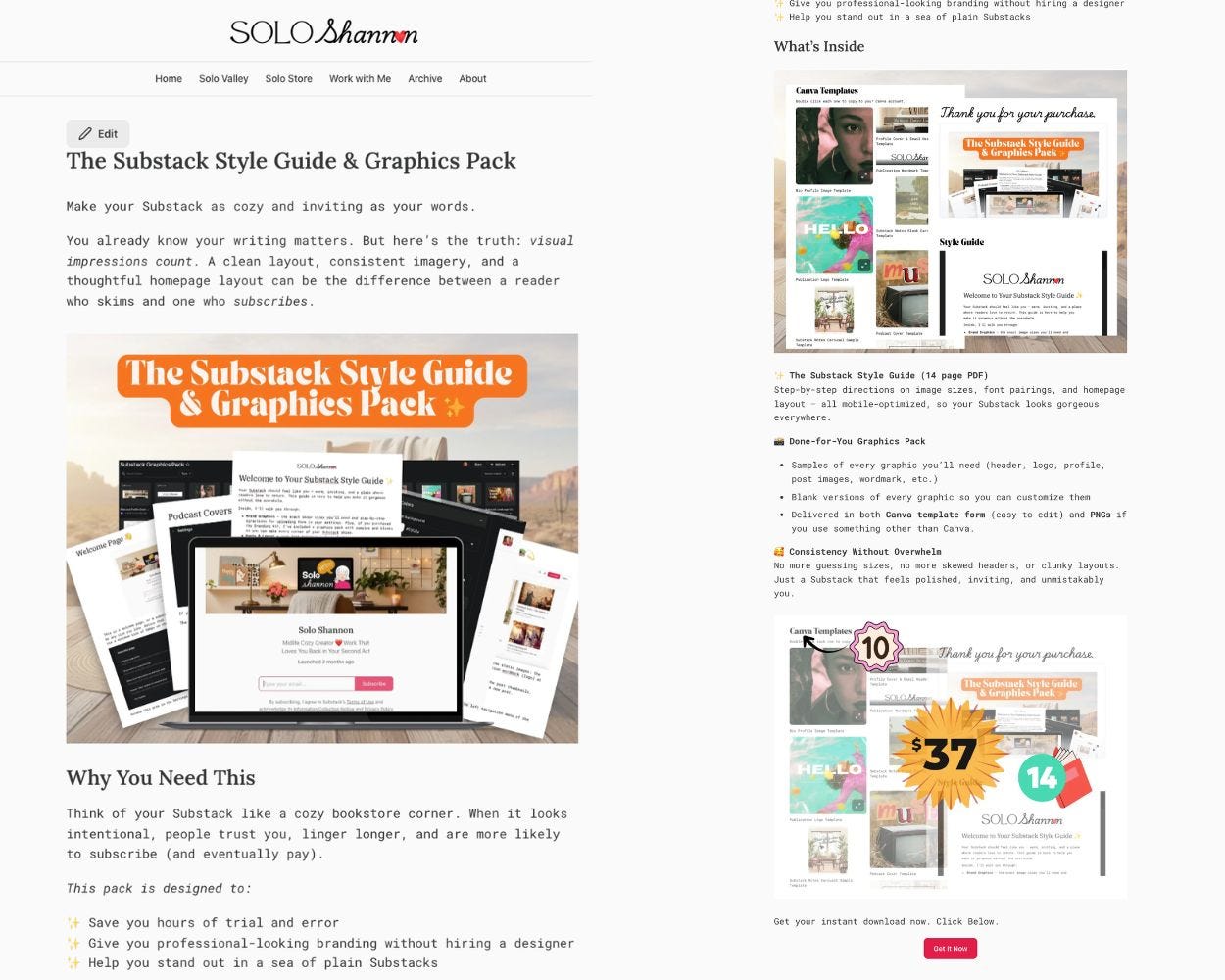
Create a custom page in your Substack publication by going to the dashboard and clicking “Settings” bottom left. Create a new page and title it the name of of your digital product.
Fill in the page the same way you create a post. Use mockup graphics to show instead of tell. Make this visually appealing and keep your pitch tight to why they need it & how it solves that exact pain point. You can check out my Substack digital product sales page to see how it all flows together. You don’t need a mile long sales letter, keep it simple.
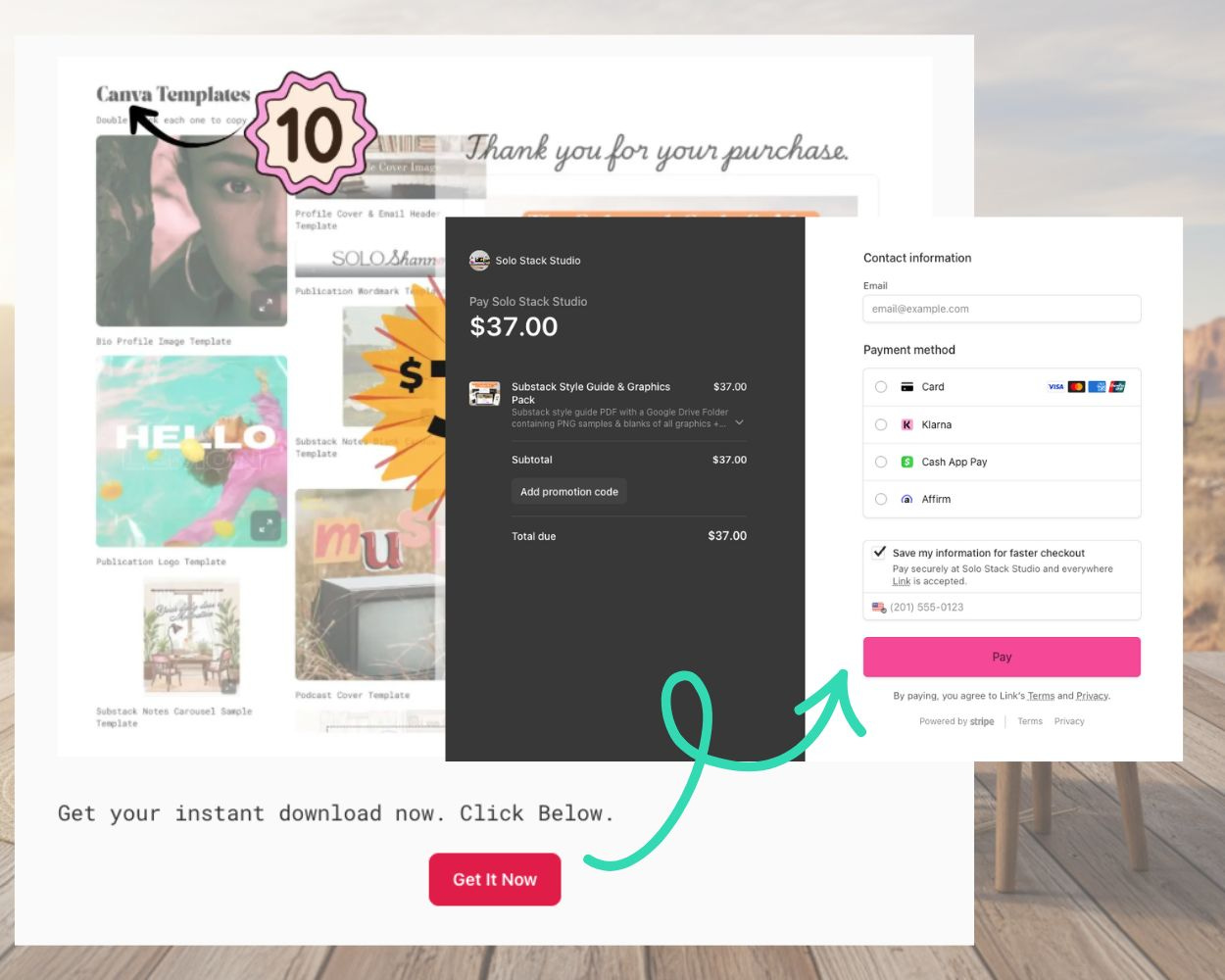
I used a custom button with the Stripe payment link to create a seamless in-app shopping experience. After purchase it will magically redirect the buyer to the deliverables we set up earlier.
NOTE: You can also create a “shop” or “store” landing page using this same technique. This page would lead out to all of your products, like this Substack store page. If you use a shop page, make sure you add your new digital product to it.
Step Three: Promoting Your Digital Product
“If you build it, they will buy,” is wishful thinking. You did all this work, and it’s a bad-ass digital product anyone would be blessed to use — but NO ONE KNOWS it exists yet. We’ve got to get your product in front of eyeballs, preferably the human kind.
Plan a 30 day content campaign around your product to intermingle with your other work. Don’t bombard, pepper it through out your posts & Notes for a month, then you can share it less frequently. This does a couple of things:
It creates lots of touch points for the buyer to feel comfortable making a purchase.
Back linking to your product & posts about your product will create more authority for Substack’s algo and Google’s.
Your Subscribers
When I hit publish on this post it will zip out to all my subs. I will specifically ask them to buy and to share. My publication is free, and my subscribers are always eager to buy products that they asked me to make rather than products ChatGPT thinks they would want. And if they don’t need it right now, they know where to get it when they do.
Substack Notes
I’ll be developing an intentional Notes series that will attract attention, clicks and shares of the product to non-subscribers. This keeps the product fresh in the minds of my subscribers and it allows the algorithm to find other Substack writers who aren’t familiar with my work.
YouTube
Links to all of my digital products go at the end of the description box of every video. Links to relevant digital products go in the pinned comment of any video I make that teaches or uses one of my products. I suspect that this will be THE primary discovery engine for my work by Q2 2026. Clicks from YT to Substack are growing with every video.
Pinterest & Socials
Facebook and Pinterest are still very relevant for discovery, but they take consistent effort and a few months to really gain traction. I’ll be Pinning and posting on Facebook all through Q4 to grow my Substack & increase digital product sales.
Promotional Graphics

You worked really hard on your digital product, don’t skimp on the listing images. Use Canva to create mock-ups and visuals that invite clicks & carts, honey. You want to turn readers into buyers and that’s a visual conversation, my friend.
Bonus: Profit Analysis
Building a digital product doesn’t have to be intimidating or even hard. It’s fun when you take it step by step and remove the overwhelm.
I won’t lie and say it’s not a lot of work, because it absolutely takes work to create something of value. I spent a total of 20 hours across 4 days on this project — from researching the idea, making the product, writing the posts for the series and launching it. If I’d spent that time on client work I could’ve billed $1500-2000.
If my price point is $37, how many do I need to sell to exceed the amount I would’ve made in a time-for-money equation?
Answer: 55
If this digital product sells more than 55 times during its life time I’ll come out ahead. And then everything from 56+ is passive income.
Share this post with someone who wants to get started with digital products as an income stream — without the stress, hustle or spammy tactics.
Need help building a digital asset portfolio? Have questions about digital products? No sales pitch answers with tea & cake below.
This is a wealth of information!! Thank you!!
You’ve taught me something new about Stripe. This was helpful. Thank you.