

How to Add a Substack Donation Button
YES, You CAN add a native Substack way to give.

Substack has one big limitation: you can charge for subscriptions, but you can’t offer a simple donation button. Readers who want to contribute to your work without committing to a monthly or yearly plan are stuck.
I kept seeing creators ask about it, and the answer was always, “Sorry, you can’t.”
So I decided to fix it.
With a quick Stripe setup and a custom button inside Substack, you can add a clean, native-looking donation button right into your posts or pages. No Buy Me a Coffee, third-party widgets or clunky workarounds. Just a direct way for your readers to support you on their terms.
Here’s how it works—and how you can set it up in minutes.
Use a button and a CTA, like this:
Want to support without a subscription? Make a one time donation below.
Go ahead and click it. You’ll see how it just pops up right here without sending you somewhere else. It works in app, on desktop and mobile. It allows your reader to donate whatever they feel led to, no pressure and NO SUBSCRIPTION COMMITMENT.
Step 1 - Go to your Stripe Dashboard.
If you have subscriptions enabled here on Substack you already have a Stripe account. If you don’t have a Stripe account, you’ll need to create one.
Step 2 - Create a Payment Link
Click on “Payment Links” in the sidebar under Shortcuts (desktop is best for this, it’s difficult to find your way around on mobile). Click the big “New” button in the upper right corner.
Select Type = Customers Choose What to Pay
Fill in your other info, upload and image if you want to. It should look like this:
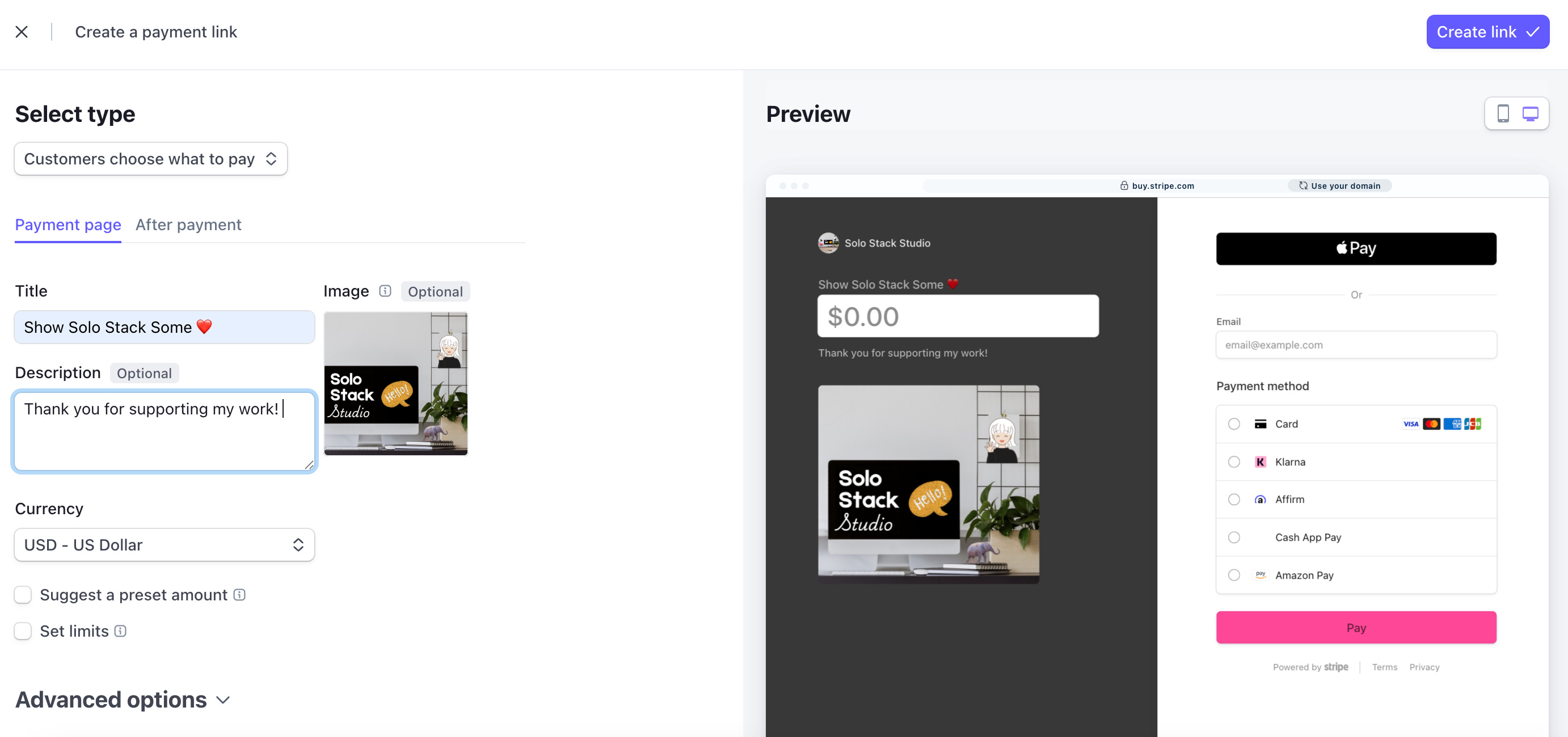
Then, hit that Create Link button in the top right.
Step 3 - Copy the Payment Link
Go back to the Payment Links page and hover over the link you just created and use the “copy URL” key to grab the link.
Step 4 - Create your Substack Button
Inside your post or page, choose the Button pull down on the toolbar and select “Custom.”
Name your button and paste the link in the URL.
Voila, when you publish the post or page your donate button is LIVE.
If you found this post helpful, please subscribe.
If it would help someone you know, share it.
And if you found it insanely helpful, you can show love by making a one time (no subscription!!!) donation below.
You Might Also Like:
Want to see how I used this same hack to create a Substack store?
How I Built a Full Store on Substack (No Gumroad required)

A few days into my Substack journey I asked if I was crazy for betting everything on Substack. No Facebook Groups, no Skool, no Gumroad, no Ko-Fi. Just Substack and some YouTube tutorials to show my work.
Hey Shannon thanks for sharing this!
I thought you might want to know you have a small misspelling in one of your button prompts: where you say “If if would help someone…”
Thank you so much for this info!